Version 1.1, 9 December 2011
CAD Extras
This plugin adds some commonly requested CAD functions to CamBam and provides a test bed for routines in development.
Many of these routines should eventually make their way into the main program.
This plugin will need at least CamBam 0.9.8L (latest stable release) to work.
This plugin does not work and is not needed with the latest 0.9.8N release.
The CAD Extras functions are now part of the standard CamBam features; available using the following menu items:
- Edit - Transform - Mirror
- Edit - Fillet
- Draw - More... (for Tagents, Spirals, Trochoidals and Ellipse)
- Edit - Surface (Edge detect and project lines to surface)
Download
download CADExtras-1.1.zip (25 KB)
Installation
To install the plugin, unzip CADExtras.dll into the CamBam plugins folder.
If the installation is successful, you should see a new entry: CAD Extras in the CamBam plugins menu.
Usage
CAD Extras currently contains the following routines:
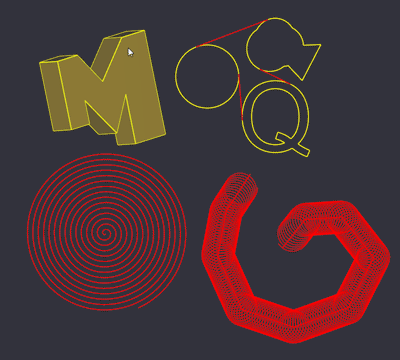
Draw - Tangent
Draws a single line segment that 'snaps' to circles and polylines.
A triangle icon is displayed at the tangent points and the end points should 'snap' to these.
Draw - Flat Spiral Draw
Draws a flat spiral polyline (spiralling inside to out).
Prompts for stepover (distance between each loop), and the spiral direction.
This may be of use to people experimenting with fast machining methods by using the spiral as a toolpath with an engraving operation.
Draw - Spiral Path Draw
Another flattened spiral polyline, but this time with constant radius moving along a path (specified by first selecting a shape for the spiral to follow).
Again this may be of use for high speed machining experiments or decorative finishes.
Draw - Trochoidal Path Draw
Similar to 'Spiral Path Draw', but implemented as slightly overlapping trochoidal C segments.
Intended for high speed machining experiments.
Draw - Ellipse
Draws an ellipse within a bounding rectangle.
The ellipse is comprised of small line segments. To convert to arcs, use the Edit - Polyline - Arc Fit command.
Edit - Fillet
Insert arc fillets of a specified radius into selected shapes.
Currently, fillets will only be inserted between adjacent straight (line) segments.
To create a fillet between distinct line segments, they must first be joined to form a single polyline.
Transform - Mirror
Creates a mirror copy of all selected drawing objects about a mirror line. The mirror line is specified by selecting two points
along the line.
Surface - Edge Detect
Will dump edge lines detected from selected 3D meshes.
These are triangle faces edges that have no neighbours, or the neighbouring face forms an angle.
Surface - Project Lines to Surface
Selected drawing shapes will be projected onto any selected surface objects.
The routine prompts for a Projection Resolution. This is the distance along each drawing line at which the Z height is tested.
If a point along the line is outside any surfaces, the minimum depth of all selected surfaces is used.
Revision History
- Moved some functions to new Draw, Edit and Transform sub menus.
- Added Draw - Ellipse.
- Added Draw - Trochoidal Path Draw.
- Added Edit - Fillet.
- Added Transform - Mirror.
- Added Surface - Project Lines to Surface.
- Draw - Tangent - now also snaps to draw objects
- Draw - Tangent - improved fixed point to tangent drawing
- Surface - Edge Detect - short segments now joined to polylines
Version 1.0
download CADExtras-1.0.zip (15 KB)